I downloaded a new iPhone native app this morning called Twinkle, which is a terrific Twitter client with integration to the iPhone's camera and the radio geolocation abilities. Even without those two enhancements, Twinkle would be - by a long shot - the best option for the iPhone when it comes to Twitter. To get Twinkle, you need to install it via the Installer.app program for jail-broken iPhones (see below for some more info).
Twinkle automatically figures out (approximately) where you are using Erica Sadun's FindMe utility, and uses that to label your Twitter posts with your location - very cool. It also allows you to cclick on a "near me" button to find posts from people located - you guessed it - near you. You can fine tune the distance and it's a nifty addition to Twitter.
A few observations:
- Twinkle is a very fast app - which is welcome since web-based options tend to be very slow, to the point of painful. This app, however, races.
- The UI design and usability to pretty darned terrific. It's quite well though-through.
- I wish I could follow people from within Twinkle. That's one feature that's missing. I hear it's coming soon though.
- Looks like I cannot click on URLs in tweets - that's certainly a missing feature (also coming soon).
- Need links to pics that are posted in the tweet - Can't see a reference to the image in the web Twitter interface if I include a pic.
- The app has has crashed on me a number of times while it's trying to do the geolocation, not sure if my fringe-area location has anything to do with that or not.
Of course, the app creator has a Twitter account, and you can see how popular it's becoming when you look at tweets that refer to Twinkle on TweetScan.
A few iPhone screen-grabs to show it off (click each one to view full-size):

View of my followed peeps' tweets

You wouldn't normally see this too often. My
fringe coverage area means I'm hard-to-locate.
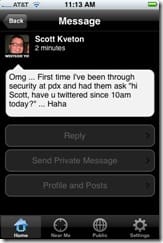
Viewing an individual tweet, with ability to
reply, direct message, or go to the tweeter's
individual profile/post page.
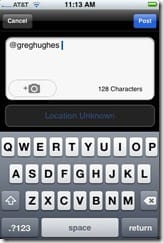
Replying to myself. Yeah, that's a little weird.

What you see when you view an individual
profile. Nice.

Ah screen-door effect. Taking a picture
to attach to a tweet.

Note the paperclip showing a picture is
attached. Also, the character count actually
works and is accurate, which is a weakness
of many twitter clients.

Clicking on the paperclip allows you to
view the attached image - a nice friendly
addition. You can also remove the image
from here, if you change your mind or
want to shoot a new one.
*Note: In order to use Twinkle today, you have to "jailbreak" your iPhone, a modification that allows third-party applications to be installed on the device. In the future, you will hopefully be able to download Twinkle from the Apple app catalog (once it's made available). But not today. *An obligatory word of warning... If you do the jailbreak process, Apple won't provide support on your phone in the event you need it (unless you restore the phone to non-jailbroken status of course). The ZiPhone jailbreak app is slick and simple - you can just download for Windows or Mac, plug in your iPhone, click a few times, wait a few seconds and you're done. Google it if you want, you'll find it.

Member discussion: