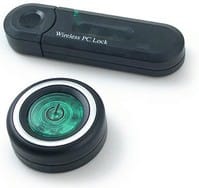
 Last year, I picked up a couple Wireless PC Lock devices, to see if they'd work in a business environment to control workstation security. What I found was that I'd purchased what seemed to be some cool hardware, packaged with really crappy software. In fact, the software was so bad, it made the hardware pretty much useless. Useless doesn't help in the security world, so I was disappointed overall.
Then about a week later, I discovered that Bryan Batchelder, another security type, had also picked one up, reverse engineered how it works, and written his own software for it. Bryan's software was a vast improvement - measurable in orders of magnitude - over the software that shipped with the hardware.
Then Scott Hanselman, a coworker and friend of mine, found the device and software and decided to contact Bryan and work with him to use take it to the next level, using the new .NET Framework v2.0, to control and take advantage of the hardware.
And today, a new article was published that Scott wrote for hobbiest programmers, as an installment in his excellent "Some Assembly Required" series on Microsoft's MSDN Coding4Fun site. The article is entitled, "Is that you? Writing Better Software for Cool USB Hardware." In this edition, Scott explains how the new software, built from Bryan's base, is made and how it can be extended by anyone who wants to (since it's an open source program published on SourceForge).
 I've installed the new software myself (after downloading and installing the .NET v2.0 Beta 2 framework) and have it running, and I can tell you this: The new software really shows how cool the hardware is, as opposed to the original software, which made the hardware look sloppy and bad.
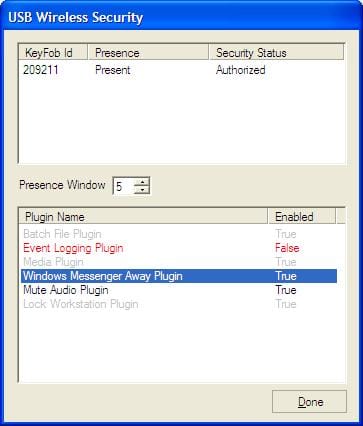
The hardware consists of a USB stick (it looks much like a USB storage device) and a small round button you can hang on your keychain (or wherever). With the new software, a tiny green icon appears in the Windows status notification area (the tray) and flashes to show you it's getting a heartbeat from the key fob button. If you turn the button transmitter off (it lasts for-freakin-ever on one battery, mine's almost a year old and it's still going strong), the software on the compute notices and does whatever it's configured to do. The image below gives you an idea of the things it can do out of the box, and it's plug-in-able, so if you want something else, you can go build it.
-
Buy the hardware if you don't have it
-
Download the new USB Wireless Security software (source also available at that link)
Hmmm, gotta go see if I can learn enough to be able to write a plugin now. 

Member discussion: