I like to listen to my Pandora "stations" in the background while working on my laptop. I get frustrated when I accidentally close the web browser (often its in a hidden tab) or, even worse, click on a link soewhere and Safari, in all it's awesomeness and wisdomness, re-uses the window and kills the audio feed.
In hopes of finding a better way, I started searching for a Pandora widget for the Mac Dashboard (the layover-page that you can put any of a number of downloadable mini-apps on). Unfortunately, I didn't find anything. (Update - turns out there is a widget out there, but it's a memory hog and apparently has a few issues). So, rather than looking for someone else to do the work for me, I started to actually think about a solution I could build on my own.
After about 10 minutes, I remembered the nifty capability in Safari to define a "snipped" portion of a web page and make it a Widget on the OSX Dashboard. You use the little scissors icon in Safari to accomplish this. I started thinking about the Dashboard and how it works, and wondered if there was any way to have Pandora play in the background using a system (the Dashboard, that is) that appears to reload each app every time I launch it.
What the heck, worth a shot, right? Well, I found I could create a web-clip of Pandora's music player that would play my music. No big surprise there. Click on the image to see the widget full-size.
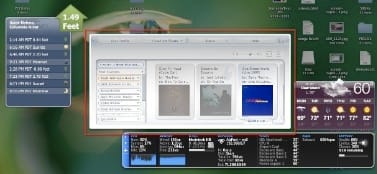
But when I exited the dashboard to go do some actual work, the music would quit.
Bummer.
I got curious though. Maybe someone had thought about the fact that web pages constantly change and play music and whatever else. I did the obvious: I clicked on the little (i) button in the lower right corner of the widget and it took me to the page where I can choose to make the widget look like it's torn from a piece of paper, or whatever. And, lo and behold, right there in the lower left, is a box that makes it appear you can uncheck it and make the audio play in the background, even when dashboard is not active. I've highlighted that box below.
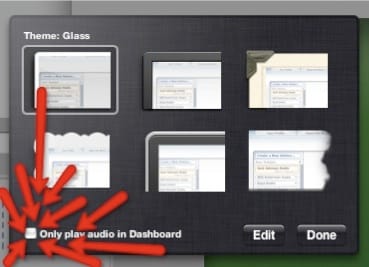 Would it work? I unchecked the box, exited Dashboard, and the music kept on playing in the background. Problem solved! It turns out the default setting is to play web page audio only when Dashboard is active, so you have to toggle the setting to get what you want.
Any other ways to do this? My method works great, but I wonder if someone else came up with a different solution?

Member discussion: