I recently started carrying around a Blackberry 7290, which (aside from the fact that it’s an electronic leash) I like a lot. One of the complaints I have about it, though is a lack of anything beyond the stock, simple, same-old Blackberry ringtones. Well, as it turns out, you can add ringtones of your own. If you were to search the depths of the help file on the device, you’d find some information about this, but – I mean come on – who actually reads help files?
Now, granted, you’re limited to the relatively simple audio implementation supported by the Blackberry device, meaning MIDI files only – and you can’t play polyphonic sounds on these devices. But in Crackberryland, just having the ability to add my own personalized sounds is a welcome fix!
So, if you want to try it yourself – here you go. Keep in mind, I am working from the point of view of a being a RIM7290 user with service from AT&T Wireless – uh, I mean Cingular. So, that’s what you’ll see here. This should work with certain other models and service providers as well, but since I don’t have other devices to test with, you’ll just have to try for yourself. Feel free to comment here (see comment link at end) with your experiences.
Step One: Get your Blackberry’s web browser working – Hopefully you’re already good to go in this area. You’ll need to use the M-Mode browser and go to a page on the Internet that will provide you with the MIDI files.
Step Two: Find some good MIDI files – There are two common ways to do this, but ultimately this step involves simply downloading a MIDI file to your device from a location on the Internet:
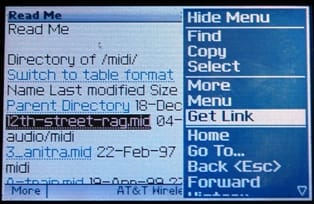
Option A: Just find some random MIDI links and load them… One way to do this is to browse to a site that has links to MIDI files and just click the links. For example, point your Blackberry’s browser to http://sprott.physics.wisc.edu/midi/?plain (found it searching on Google) and if your browser cooperates, you’ll be able to click on a midi file link:
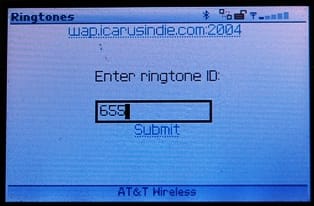
Option B: Use a site that has lots of MIDIs and makes it easy (note - web addresses updated 3/2008)… Namely, you really can’t beat the amazing number of selections available at the Free Ringtone Heaven, and you can easily use this site to update your Blackberry’s ringtones. Browse to http://www.freeringtoneheaven.com in your computer’s web browser and find ringtones you want to try (there are more than 49,000 cataloged there). You can listen to the MIDI files on your computer, but remember they will sound different (much simpler) on your Blackberry. Once you’ve found a few choice audio files, make note of their ID numbers and point your Blackberry’s M-Mode browser to http://www.freeringtoneheaven.com/wap.php (this link works on your Blackberry, but on your computer it may throw an error – this is normal). You’ll see a screen where you can enter the ID number of each MIDI file you want to load – one at a time:
Step Three: Listen to the files and save the ones you like to your Blackberry Device – It turns out when you launch a MIDI file, the Blackberry 7290 has a player for the format. As soon as it is downloaded, the MIDI file will start playing on the handheld.
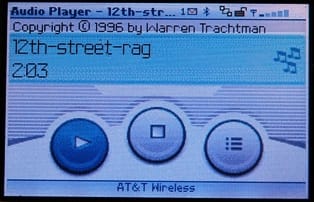
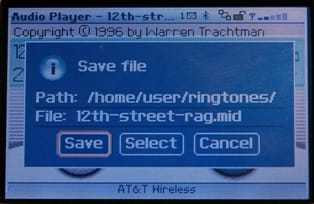
You’ll see three round buttons in the Blackberry audio player – One starts the audio file, one stops it, and the other gives you an action menu – which includes the option to save the MIDI file to the handheld:
A couple of quick hints about MIDI files for the Blackberry:
Dealing with file names can get kinda goofy on the Blackberry. I downloaded The First Noel and ended up with a sing called “Get” on the handheld – which is the name send down via the PHP app on the Icarus web server. Annoying, but there is a way to deal with it, you can rename the MIDI files as you are saving them – just move the cursor to the “File:” field in the Save File dialog (pictured above) and give the file a more meaningful name before you save it.
- Small MIDI files are usually simple MIDI files, and that’s a good thing for our purposes. Simpler – in terms of the number of instruments playing at once – will more often than not translate into better sound on the Blackberry, since it seems to play only one MIDI voice/channel at a time. Of course, so if you find a MIDI file you really like, you can always try it and delete it if it doesn’t sound good enough on the handheld.
You can delete audio files you don’t want any more by going to Profiles on the home screen, clicking the wheel once and choosing Show Tunes…
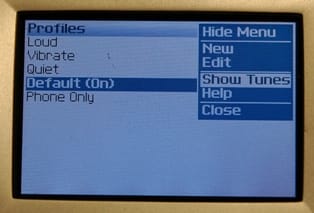
…and then highlighting the file name, clicking one more time, and choosing Delete from the menu. Bye-bye MIDI file.
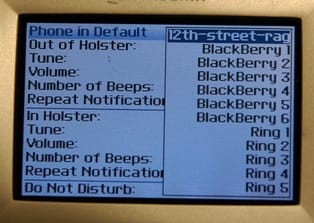
You can choose where to use your new MIDI files just like you would any other Blackberry ring or alert tone.
That’s about it – enjoy!

Member discussion: