Just the other day someone asked me why Internet Explorer had lost its menu bar after they ran a Windows Update. Of course, the "problem" was IE7 and the fact that the whole UI changed. Remember, IE7 is considered a critical update (and the first time an IE version has been promoted as such). The classic menu bar of the previous browser versions (and practically every other Windows application) is no longer visible by default. There are a couple ways to turn it back on, but when you do the result is not exactly optimal for some people. Maybe they're just whiners or getting old and set in their ways, but whomever you may be there is a solution for you. (Oh, and before people start saying "yeah, use firefox instead" please just stop and understand we got the point a long, long time ago. Firefox rocks, but this post is about menu bars in IE. tyvm.)
One thing many people don't realize is that the menu bar is actually still there in IE7, and one way you can access it just by hitting your ALT button. One tap and there it is, ready to use.
Or maybe you want it on all the time. To accomplish that in IE7, click on the the Tools menu (it has a little gear icon) and select "Menu Bar" from the options there. Now you have the menu bar back full-time and you can do your File, Edit, View, etc stuff all you want.
But, when you enable the menu bar, it actually appears below the address bar, which is a little weird for some people. And worse, you can't unlock and then drag and drop the menu bar to rearrange things because the address bar is not in the draggable/droppable list of UI stuff. everything appears below it. Bummer.
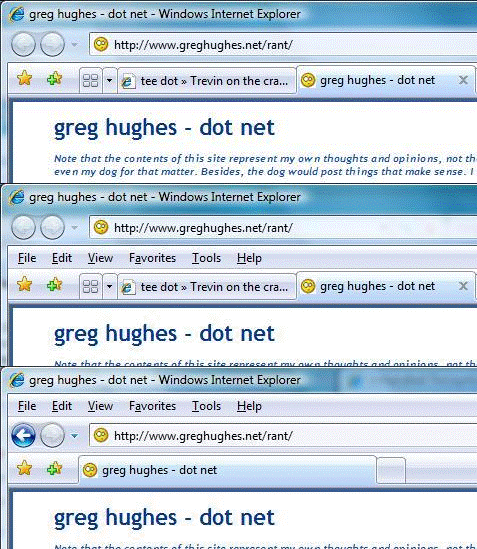
Have no fear. Chris Hanscom has posted a nice little registry hack that lets you put things back to the way you want them. The little animation above shows the three phases of menu bar goodness: Turned off completely (the IE7 default, which get a little more web page content on the screen and above the fold), Turned on and below the address bar (IE7's default location), and post-registry-hack style, with the menu bar back where you've expected it to be since dirt was first made.
So, no matter what your preference is, you have an option to meet your needs. Enjoy. And thanks to LifeHacker via Omar for the find. Check out both those blogs if you haven't already. Good stuff.

Member discussion: