I've been a T-Mobile Hot Spot subscriber for more than a year now. I have used it all over the country, and it's always there when I need it, whether I am traveling or if I'm just dropping into a Starbucks for coffee on a whim. It lets me leave my desk and still work from time to time - and we all have those times when the value of sitting in a coffee shop where no one can find you in person is seriously valuable.
One thing that's always frustrated me is the fact that I always have to open the web browser and load some random page to authenticate to the HotSpot service. It's a pain, and today (while sitting here logged onto a Starbucks HotSpot in Beaverton, Oregon) I decided to see if there was anything available to automate the process for me.
You can imagine how stupid/ignorant/DOH! I felt when my google search pointed me right back to T-Mobile's web site, where I found a description of their Connection Manager software. After hitting the 'back' button on the browser a few times to return to the page confirming I was signed on, I decided to read that page for the first time and sure enough, right there in the menu bar is a link to "Download Connection Manager." Heh.
Turn off your speakers if you're in the coffee shop before you click on the link, though, or you'll quickly become the target of startled stares from everyone else in the shop when the completely unnecessary Flash movie with LOUD SOUND. Kinda like this (you'll need those speakers back on again, dude).
Download the file, run the installer, and choose from a completely goofy skinned app or a Neapolitan-colored stylized app. I chose the lesser of the two evils.
Then things got interesting. It immediately required me to disable the Wireless Zero Configuration Service in Windows XP, which will no doubt break everything else I had set up for wireless connections prior to installing this thing. It sure as hell better work... Why can't things be simple an non-intrusive?
Now, clearly this software does more than automatically log you onto their regular WiFi HotSpot network. It sees a WPA-protected network, which means encryption and privacy. +1 for that. And the the EDGE/GPRS options obviously refer to using their data cards to connect from the road. Cool to have that in one place. Too bad there's no task bar icon when the app in on the screen.
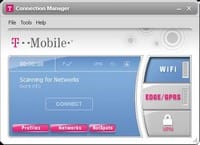
The interface works well and there's really a whole slew of options. One of the coolest was the fact that when I went to the "Tools>Settings" menu and chose the "VPN" tab, it automatically detected my Cisco Systems VPN client and all of it's profiles and let me choose which to use when clicking the big, fat "VPN" button in the T-Mobile UI. It works great, and I'm connected as I type. Nice feature:
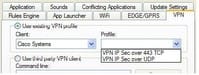
* VPN options dialog - click to view full size*
Perhaps one of the greatest benefits of using the software is the availability of the secured wireless network. Seems like they could offer this without having to install custom software, but oh well...
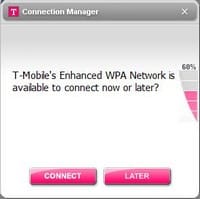
Access to a secured network - click to view full size
Here's where the automatic logon happens - they give you the opportunity to provide your T-Mobile account name and password, and you can save it for later use:
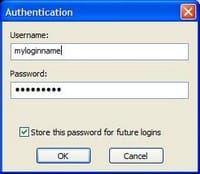
Save your credentials to authenticate automatically later - click to view full size
Of course, it failed miserably when I first tried. I had to randomly select a whole slew of messy windows that kept popping up when I was trying to fill in the account dialog. Some of them were especially helpful:
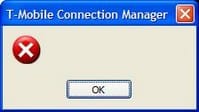
Not sure what they're wanting with this dialog
But eventually (after fighting several windows that continually took focus away from the "enter your authentication info" dialog box) I found success:
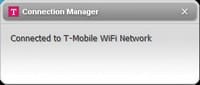
Success - click to view full size
Sure enough, wireless zero config is disabled and I am connected using their software. Good enough for now, but that will likely have to change due to the complexity of some of the networks I have to access with this thing. We'll see.
As I was typing this, without warning yet another random box pops up and steals focus. Apparently it was downloading every single T-Mobile HotSpot location in the entire freakin' world. Weeee... Anyhow, it was bit confusing for a second, and all these windows just popping up, downloading stuff without asking and stealing focus are aggravating and just plain bad design. But it does work:
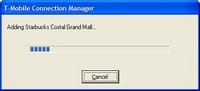
Random pop-ups everywhere - click to view full size
So... Despite the fact that it's custom, proprietary software, there are some cool things in this app. For example, the Available Networks dialog is better than anything built into Windows:
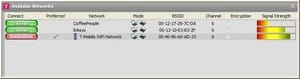
Nice network list visuals - click to view full size
Well, I'll leave it installed for now. Maybe I'll get lucky and the other networks I access will just work. Not counting on it though. Heh.
Somewhere there must be a third-party app that will automagically log me on. Just haven't found one yet. Maybe I'll make one.


Member discussion: