Google has released a Chrome Browser add-on called Chrome Remote Desktop Beta that allows two computers running Chrome to be connected to so person can control the other person's computer. For those of us who occasionally need to connect from, say, your place in Portland Oregon to a computer in Boulder Colorado to troubleshoot a certain family member's computer issues, this is a simple and workable method. Of course, many of the tech-support requests are actually efforts to get you to visit your mom, so keep that in mind. But I still think you might find this new capability helpful. It allows any computer running Chrome - regardless of the operating system - to connect to any other computer running Chrome. So your Windows computer can control a Mac or Linux machine or vice-versa.
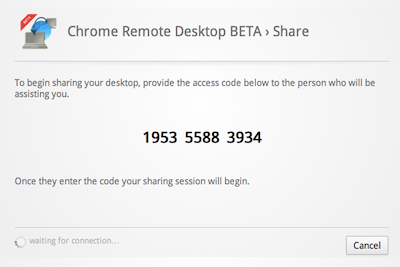
You can set it up and get started in just a few minutes. First, you need to have the Chrome browser on both ends of the connection, your computer and the one you want to connect to. Next, download and install the Google-created extension. One you complete that step, you'll find a Chrome Remote Desktop Beta icon in your browser window. When you run it the first time, it will propt you to grant some extra permissions, which are required for it to work.
The next step is to share your computer, or alternatively to connect to another shared computer. Both options are available to the user. If you choose to connect to a shared remote computer, you'll be prompted to enter a numeric code that is generated when the person on the other end of the line starts the sharing process. The "sharer" just provides the one-time code generated by the app to the person who needs to remotely connect. Access codes are good for just that one session, which helps ensure security.
This is the initial release. Google's description of the browser app:
Chrome Remote Desktop BETA is the first installment on a capability allowing users to remotely access another computer through the Chrome browser or a Chromebook.
The goal of this beta release is to demonstrate the core Chrome Remoting technology and get feedback from users. This version enables users to share with or get access to another computer by providing a one-time authentication code. Access is given only to the specific person the user identifies for one time only, and the sharing session is fully secured. One potential use of this version is the remote IT helpdesk case. The helpdesk can use the Chrome Remote Desktop BETA to help another user, while conversely a user can receive help by setting up a sharing session without leaving their desk. Additional use cases such as being able to access your own computer remotely are coming soon.
Chrome Remote Desktop BETA is fully cross-platform, so you can connect any two computers that have a Chrome browser, including Windows, Linux, Mac and Chromebooks.

Member discussion: