 Wow, I sure have been making use of my HP MediaSmart Windows Home Server since I acquired it late last year, and to be honest I have not really even scratched the surface. With 64-bit client support coming soon, I am excited about the future, too.
After working with a bunch of music, video and image files over the past few weeks, not to mention computer backups, the single 500GB drive that it came with is both a little small and represents a single point of failure that I realized I don't want to take a chance on. So, I logged onto newegg.com last weekend and ordered a 1TB Western Digital SATA2 hard drive at a great price. It arrived today,and I slapped it into one of the three open trays and slid it into the slot. Within half a minute the drive showed up in the Home Server console and I was able to add it to the storage with a couple clicks and a two minute waiting time:
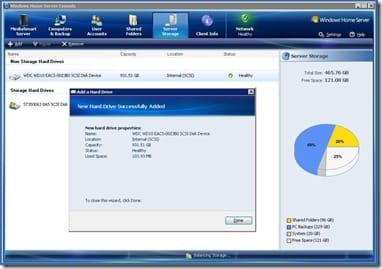
What a slick and fool-proof process they've come up for adding drives in Windows Home Server. Anyone can do it. It's great stuff, and the add-on community is thriving - There's a whole slew of community-created programs that you can install on your home server to add functionality. It's quite useful and a lot of geeky fun.
With the addition of community programs and the overhead of the additional HP software, the memory's a bit short. So I have a 2GB sick of RAM sitting on my desk, wait for me to decide if warranty risks of taking it apart to beef up the RAM are worth it. Do I dare?

Member discussion: