If you sense a pattern to my post titles, you're really paying attention. Recently I spent a few weeks using the Samsung Blackjack, a new Windows-mobile smartphone. Within the first 24 hours, as I wrote last month, it became clear to me that the phone wasn't going to work for me, being a power user of mobile technology for critical, fast-paced business. In other words, Crackberry-style. You can read my experiences here, and also know that while I was able to adjust somewhat to the Blackjack, the three weeks that followed that first "24 Hours" post were not significantly better than my initial impressions.
 For the past few days I reverted to using my tried-and-true Blackberry 8700 again. I went back because using the Blackjack was holding me back in a substantial way, and I am so busy at work right now I needed to get back to something that would perform and work the way I work. It's worthy of mention that after about 10 minutes using the Blackberry my old wrist pain started to come back. Not a good sign. the 8700 is wider then the Blackjack and the Treo, and I found that holding it was stretching my thumb out in a way that was causing me pain. So, that's a good thing to discover. Also, while I enjoyed the quick usability of the Blackberry the moment I went back to it, I found the screen and general look and feel to be plain and stark after living in Windows Mobile for a few weeks.
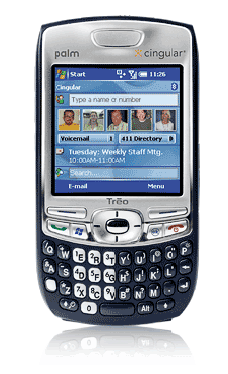
Anyhow, on Wednesday this week, a new box arrived via FedEx from Cingular (despite the much-hyped winter storm) and I swapped the Blackjack and the Blackberry back out again in order to give the new Palm Treo 750 a try. This is the latest of the Windows Mobile 2005 enabled Palm devices. It runs Windows Mobile Phone Edition v5, plus Palm has made some nice little enhancements to the home screen (or "Today" screen, as they say) and other software interfaces. To be honest, I was quite skeptical about whether this new device would be sufficient after my experiences over the past few weeks with the Smartphone version of Windows Mobile running on the Blackjack hardware. But I can report today that I am pleasantly surprised, and that I may have actually found a Windows Mobile phone that can replace my Blackberry for real-world use.
To be certain, the Treo 750 is a significantly beefier (both physically and figuratively) device than the Blackjack. But it is fast and smooth, very well designed and crafted, and is thought-out in a way that most other devices are not. Palm's attention to the enhancements they made to the home screen and some of the underlying software is indicative of their usability focus, and that's important. In fact, it may just make the technology sufficiently usable for what I need. Pretty much anything I need is accessible right there on the home screen. Because it's a PocketPC version of Windows Mobile, it has the touch screen and a stylus, so I can use my finger or the metal pen thing. Of course there is also the ubiquitous five-way button pointer just above the keyboard pad that works quite well for navigation, too.
So, what is it that is so much better about the Treo 750 that has me singing it's praises? Let me count a few of the ways:
It's fast and more powerful. The Treo doesn't miss keystrokes or pause for several to many seconds when you launch an application or try to do normal everyday tasks.
The way Palm approached text and MMS messaging is very cool - It looks a lot like an instant messaging interface and makes for a fast and positive text messaging experience.
Better speakerphone.
More advanced Windows Mobile software, with the ability to run PocketPC applications.
The keyboard is pretty darned terrific, leaps and bounds better than the Blackjack's.
The Treo loads web pages reliably and faster than the Blackjack, which is interesting since the 3G network the Treo uses is not (yet) HSPDA. The Treo currently runs on the UMTS network, with a HSPDA software upgrade slated for the first half of this year.
Check out some of the ease-of-use enhancements in a one-minute PC WORLD video here.
What are some remaining Treo 750 and Windows Mobile shortcomings? There are a few, if I want to get nit-picky:
Battery life in my subjective first-day use on the high speed network was better than the Blackjack, but it is still not up to par with what one gets out of the Blackberry (which is and EDGE network device, for the record - slower yet again).
More proprietary connectors?? I know, it's a Palm creation. But seriously, why the heck can't we just charge and sync via a standard Mini-USB2.0 port? Time to locate and buy some more accessories. If I had $29.00 for every cheap plastic vehicle charger I ever bought, I'd be just about break-even.
- The Inbox application on Windows mobile doesn't let you aggregate all your mail into the main inbox if you use subfolders in Outlook/Exchange to organize your email. More on that and what I did to alleviate the problem this evening can be found below.
Quick sidebar: My friend Trevin reacted in an IM conversation tonight to my petty complaints about the devices by saying, "Oh, cry me a river Hughes." Heh. Hey, man... You know, it's picky, difficult people like me that gently drive usability experts back into their corners and holes (in a friendly way, of course) where they make technology miracles happen in the next rev, and we also provide them with wish lists of things that would make us buy their stuff. Everything I say is intended to be taken from the perspective of "room and opportunity for improvement." Now, Trevin tells me he likes the smaller form factor of the Blackjack. The Treo is just too large and unwieldy for him, he says. Well in my book the Treo is smaller than my Blackberry 8700, at least width-wise, and that's a good thing. The Blackjack was almost too small. And yes, too small is possible - especially when you have to fit a QWERTY keyboard on the thing. Also - Trevin's a truly terrific guy, and I respect his opinions greatly. We have different perspectives, different jobs and use our devices differently. And he was being sarcastc in our IM chat - a little poking fun at friends kind of thing.
For some additional perspective, I'd suggest reading Walter Mossberg's Personal Technology article from Thursday, in which he says he thinks the Blackjack is a better device than the Treo 750 overall, although he recognizes some of the benefits of the Treo. It's clearly a purchase decision to be made based on individual and specific needs. Walt also points out that the newly-announced Apple iPhone (or whatever they end up calling it), which won't be released for several months, will likely be a killer for an of the Windows Mobile phones. Time will tell. The iPhone looks terrific for sure, but until I see one and use it, I am not convinced it would work for my particular business power-user needs. But that's also not likely to be the target market.
As I noted in my Blackjack review and above, I have always been a hyper-organizer of email, using folders and subfolders in Outlook and Exchange to organize email by type and recipient. As a result, due to the way the Windows Mobile Inbox works, in order to see if any email has arrived that gets distributed to any folder other than the inbox, I have to navigate the folder tree on the mobile phone, which requires a whole bunch of clicks and scrolls. Now, the full Windows Mobile edition on the Treo 750 includes a much simpler and easier mechanism in the form of a Folders menu, which allows me to much more easily access the folder list. But what I really wanted was what I was used to: A mobile inbox where all email sits, regardless of how I organize it in my desktop Outlook client.
So, I found myself in a bit of a stuck situation, until I got to thinking about it and spent a few minutes this evening IMing with Trevin. I had briefly thought of dumping all of my Exchange folder hierarchy completely and changing over to using Search Folders in Outlook. Trevin told me he only uses search folders and that he uses them extensively. I am running Outlook 2007, and the search performance in that application pretty slick, so I made up my mind and went straight to my Outlook rules and exported them (just in case), then deleted them all. Now all my email would go to my inbox. I started setting up search folders and found I could actually do a lot more with those than I realized - That's something I will be getting deeper into at a later date. Anyhow, I replicated and created the necessary functionality and effectively solved by mobile inbox issue. Now the phone puts everything where I want it and Outlook shows me what I need to see the way I need to see it, only even better than it did before.
I will always like Blackberries, and I am sure I will be running new ones now and then (since I tend to be the guy who tests the new stuff). But for now, the 8700 is gone and the Treo 750 is in its place. It will be interesting to see how it performs over time, but this time around I have a level of confidence that was not present on the last WinMobile trial. That's a good thing.
What do you think? Have experience with these devices? Any PocketPC/Windows Mobile software you think I can't live without (or would not want to live without)?

Member discussion: